***********welcome to Mkg Tech***********

Here's A Complete Guide To Unbrick Your Letv le2 & lemax2
how to flash ??
step.1 flash twrp
Click here LE2 users
Click here lemax 2 users
Step.2
DOWNLOAD STOCK ROM
And put into internal memory
Step.3
GOTO TWRP & CLICK ON WIPE

FACTORY RESET
BY SWIPING FROM LEFT TO RIGHT
 AFTER FACTORY RESET
CLICK ON ADVANCED WIPE

NOW TICK THESE
AND AGAIN SWIPE TO RIGHT
 NOW GO BACK
AND CLICK ON INSTALL

CHOOSE THE DOWNLOADED ROM FILE

WAIT FOR FLASHING PROCESS COMPLETES

WAIT
 NOW REBOOT SYSTEM
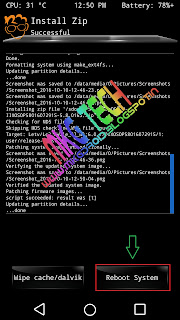
NOW YOU HAVE TO WAIT 15-20MINUTES
THEN FINISH SETUPWIZARD

 DONE
DONE
NOW YOU HAVE SUCESSFULLY FLASHED STOCK ROM ON YOUR LETV SMARTPHONE


Here's A Complete Guide To Unbrick Your Letv le2 & lemax2
how to flash ??
step.1 flash twrp
Click here LE2 users
Click here lemax 2 users
Step.2
DOWNLOAD STOCK ROM
And put into internal memory
Step.3
GOTO TWRP & CLICK ON WIPE

FACTORY RESET
BY SWIPING FROM LEFT TO RIGHT

CLICK ON ADVANCED WIPE

NOW TICK THESE
AND AGAIN SWIPE TO RIGHT

AND CLICK ON INSTALL

CHOOSE THE DOWNLOADED ROM FILE

WAIT FOR FLASHING PROCESS COMPLETES

WAIT


THEN FINISH SETUPWIZARD


NOW YOU HAVE SUCESSFULLY FLASHED STOCK ROM ON YOUR LETV SMARTPHONE

Need letv le 2 stock rok download link
ReplyDeletethis method works fine .... thank you
ReplyDeleteNice to see
Delete👌 enjoy
i have flashed lot of roms on letv le 2 then i flash stock rom...i have found error, doesn't install stock rom any solution please
ReplyDeleteDownload and flash proper rom
Deleteit stuck on system patching image unconditionly...
ReplyDeleteThis comment has been removed by the author.
ReplyDeleteMY phone go the black screen with "EUI" written, it continues with same booting screen with luke warmth, and doesn't respond, smetimes it opens up the home screen and the error message flashes like u have shared, sometime it tells that Launcher got corrupted. How to fix this
ReplyDeleteWill it get updates from leeco and will it also install automatically from updater app in eui??
ReplyDelete"
ReplyDeletebest of best i have ever scene best site amazing blog best i have ever scene admin doIng amazing work hats off
wooow amazing blog EXELLENT WORK
"
best of best i have ever scene best site amazing blog best i have ever scene admin doIng amazing work hats off
wooow amazing blog EXELLENT WORK